In a management meeting the general manager asks a simple question: how many people do we have in each department, and what share of them are Saudi? The HR officer disappears into scattered files and comes back an hour later with a rough answer. Good HR software puts that answer on a single screen and keeps each employee's documents in their own file instead of in loose folders. In this article we explain how that works in Subra.
Why is it so hard for companies to know their own team numbers?
The problem is usually not a lack of data but how scattered it is. Common causes:
- Too many spreadsheets: one staff list in HR, another with the accountant, a third with the department head.
- Documents outside the file: the ID copy and the contract sit in someone's inbox, the insurance in another folder.
- Ratios counted by hand: every time someone asks for the Saudization figure, the count starts again from zero.
- Hires nobody noticed: a new employee arrives and management only finds out at the first payroll.
The employee file: one place for everything
Tracking starts in Subra's HR and payroll module, built around Saudi labor law. The employee file holds documents, dependants, insurance, visas, letters and disciplinary records, so nobody has to dig through mailboxes when a document is needed. Employees can also upload and update their own documents from the self-service portal on their phone, and the document lands directly in their file.
Alongside the file you get leave and balances, attendance, payroll, and Saudi requirements such as social insurance, end-of-service, wage protection, Saudization and overtime. If you need exact regulatory detail for a particular case, check with the relevant official authority: the system makes follow-up easier, but it doesn't replace knowing the rules that apply to your company.
The HR dashboard: what do you see?
Here is a real screen from the demo system, and every name in it is demo data:
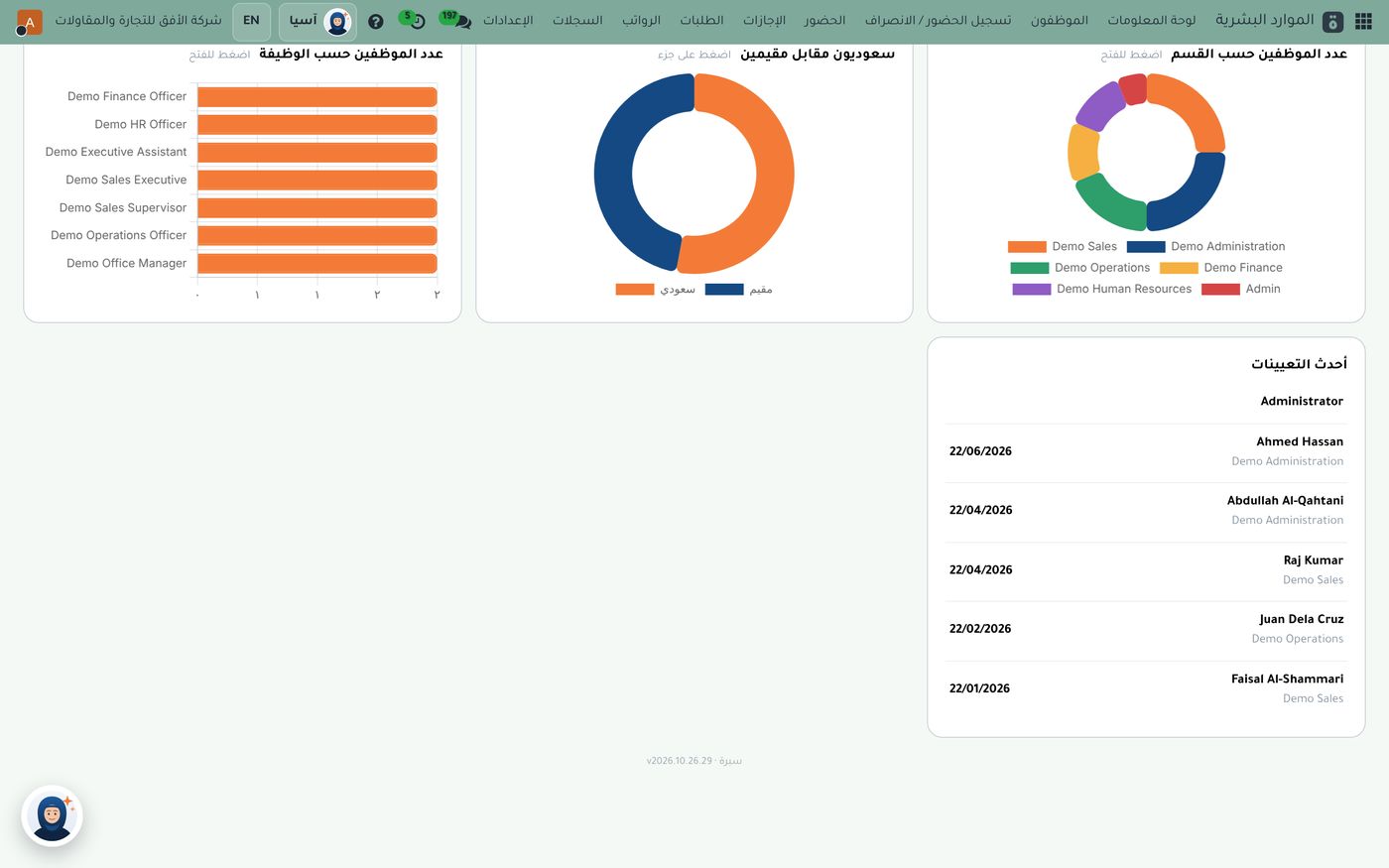
The screen has three charts and a list, each with its own use:
- Headcount by job title: a bar chart showing how the team spreads across roles, so you see where the numbers sit.
- Saudi versus resident: a donut chart that shows your Saudization ratio at a glance, with a color for each group.
- Headcount by department: a multicolored donut with a key naming each department.
- Latest hires: a list of who joined recently, with each hire date and department, so no new employee goes unnoticed.
Under each chart there is a prompt to click it, which takes you from the number to the employees behind it. That helps when someone asks: who are these people?
How to make use of the Saudization ratio
A number alone isn't enough; what matters is reading it regularly. Some useful habits:
- Look at the donut weekly, so you catch any change early after a hire or a departure.
- Compare departments: open the department chart and see where residents and Saudis are concentrated.
- Review the latest hires and make sure each new employee's file has all its documents.
- Click through whenever a figure catches your eye, and check the list of employees behind it.
Keep in mind that the Saudization ratios required differ by activity and company size, so check with the relevant authority for the one that applies to you. What Subra gives you is the current figure, ready, without a manual count.
From the dashboard to the rest of the cycle
HR isn't separate from finance. The employee you see on the dashboard is the same one who enters the payroll run, and the payslip produces its own accounting entry. We covered that flow in our article on payroll in Saudi Arabia. Employees also log attendance from their phone with location and fingerprint, request leave from the same portal, and managers approve their team's requests from their own phones.
You can also use Asia, a smart assistant dedicated to your company, to answer your team's questions about these screens.
A suggested HR routine
- Every morning: check the latest hires and make sure their files are open.
- Every week: read the Saudization ratio and the department split.
- Every month: compare the figures with last month before closing payroll.
Summary
When employee documents sit in one file, and the Saudization ratio and team breakdown sit on one dashboard, the general manager's question turns from an hour of work into a few seconds' glance. If you'd like to see this dashboard on demo data, the Role8 team will be glad to show you.
Try HR and payroll in Subra
Try Subra with demo data, or contact us and we'll set up the system for you.